What This Comparison Covers
This is not a beginner’s guide. We’re looking at code quality, feature depth, and pricing: the things that actually matter when you’re building sites professionally.
Who this comparison is for
This comparison is for advanced users who have real experience with page builders. People who work with classes, think about markup, and care about how their tools actually work under the hood.
What Elementor V4 Actually Changed
For a long time, the divide was clear. Elementor was for everyone: clients, beginners, people who didn’t want to think too hard. Bricks was for developers who wanted to work with classes, write clean markup, and build proper design systems.
V4 changed that positioning. Elementor is now actively chasing the class-based, CSS-first workflow that Bricks users have had for years.
Here’s what V4 brought to the table:
- Atomic Elements and a CSS-first architecture. Every design element is now built as a modular atomic component, with a clear separation between structure, styling, and content. The result is cleaner output and more predictable layouts.
- A proper class system. You can now create reusable style collections, apply them across elements, and update everything from one place. This is the workflow Bricks users have had since day one.
- Variables. Define reusable values once and reference them across your entire site. Not new to Bricks users, but a welcome addition to Elementor.
- Unified Style Tab. All styling controls in one place, consistent across elements. Previously, Elementor’s inconsistency between widgets was a constant frustration.
- States. Hover, focus, and active state styling directly in the panel.
- Performance improvements. V4 reduces DOM bloat significantly by eliminating legacy inline styles and replacing them with optimized CSS.
This is a meaningful update. If you were previously dismissing Elementor as a beginner tool, V4 forces a second look. It is clearly taking design systems seriously now.
The Code Output
This is where the gap between the two builders becomes visible fast. Elementor V4 has improved. The single-div wrapper per element, the removal of redundant inline styles, the shift to class-driven CSS: it all adds up to cleaner output than V3 ever produced.
But look at both side by side and Bricks is still cleaner.
A Simple Comparasion:
Elementor V4
<section class="elementor-element e-con e-atomic-element e-div-block-base" data-element_type="e-div-block">
  <div class="elementor-element e-flex e-con-boxed e-con e-parent" data-element_type="container">
    <div class="e-con-inner">
      <div class="elementor-element elementor-widget elementor-widget-heading" data-element_type="widget">
        <h1 class="elementor-heading-title elementor-size-default">Heading</h1>
      </div>
    </div>
  </div>
</section>
Bricks Builder
<section class="brxe-section">
  <div class="brxe-container">
    <h1 class="brxe-heading">Heading</h1>
  </div>
</section>
Features: Where Bricks Pulls Ahead
Elementor V4 added Components, which on paper sounds like Bricks’ components. In practice, Elementor’s implementation is more limited. You can sync content and lock layout, but there are no styling variations or conditions. Bricks components support both, which makes them substantially more useful for building scalable design systems.
On nestable elements: Elementor has nestable tabs. That’s it. Bricks has nestable tabs, nestable accordion, and nestable slider. Small difference in a spec list, significant difference when you’re building complex interactive layouts.
CSS Grid is another area where Bricks is ahead. Both builders support grid, but Bricks ships with a visual CSS Grid builder that lets you define grid areas, span columns and rows, and fine-tune placement with actual precision. Elementor’s grid controls are functional but limited by comparison.
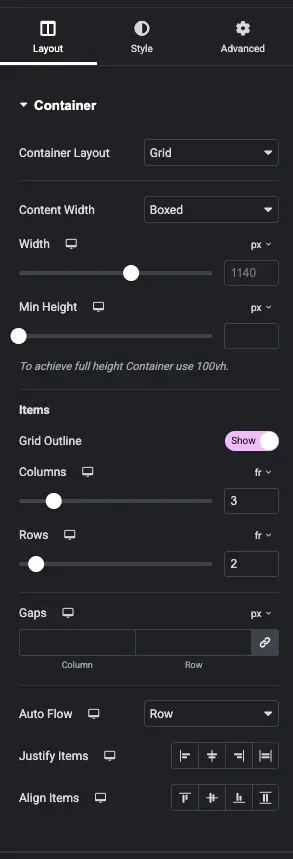
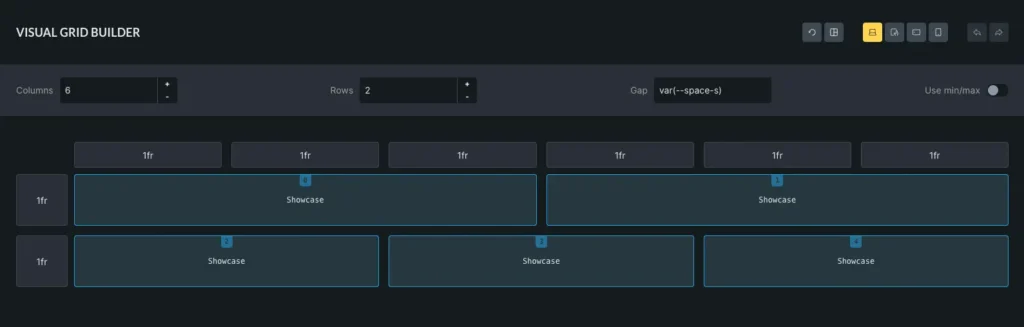
One specific Elementor limitation worth calling out: HTML tag control. If I want to change a paragraph element to render as a <li>, I cannot do that in Elementor. You are locked into predefined tag options. In Bricks, you type whatever HTML tag you want. It sounds minor until you need it, and then it isn’t minor at all.
The class limit is the most frustrating constraint in Elementor, though. Elementor caps you at 100 classes. For a professional building production sites, that limit will be hit. A single complex project with a proper design system: utility classes for spacing, typography, states, components, breakpoints. You’ll push past 100 without effort. This is not an edge case.
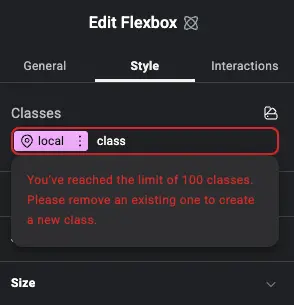
I could keep going and compare feature after feature, but the pattern is consistent. Bricks is steps ahead. If you want to see the full picture of what Bricks can do, read my Bricks Builder Review 2026 where I cover the feature set in depth.
Update: Elementor increased the limit to 1,000
Elementor has raised the class cap from 100 to 1,000. It’s an improvement, but it’s still a limit, and that’s the real issue. A class system shouldn’t have a ceiling at all. The biggest page builder on the market, powering 18 million websites, still isn’t confident enough in its own architecture to ship classes without restrictions. Bricks has never had this limitation.
Pricing
Bricks offers both yearly plans and a lifetime license for a one-time payment. Plans start at $79/yr for a single site, going up to $249/yr for unlimited sites, with a one-time Ultimate Lifetime license at $599 for unlimited sites. No credits, no bundles, no recurring upsell.
Elementor’s pricing is a different story. There are six plans across two tracks. For individuals: Essential (€5/mo), Advanced Solo (€7/mo), Advanced (€9/mo), and One (€14/mo). For agencies: Expert (€17/mo) and One Agency (€37/mo). All billed annually.
On the surface that looks like choice. Look closer and it’s a funnel. The cheaper plans are deliberately stripped down — no custom CSS on Essential, no popups, no eCommerce. The moment you need those features as a professional, you’re pushed up the tiers. And at the top of every column sits their “One” plans — One for individuals, One Agency for agencies — both marked “Best value”, both running on a credit system that bundles AI generation, image optimization, email deliverability, and accessibility tools into a single recurring subscription.
Verdict
Elementor V4 is a real step forward. The class system, variables, components, and improved markup are exactly what Elementor needed. If you’re already invested in the Elementor ecosystem, V4 gives you workflows that were previously impossible.
But Bricks is still ahead for professional development work. Cleaner output, no class limit, full HTML tag control, more capable nestable elements, a better Grid builder, more flexible components. The gap has narrowed and V4 deserves credit for that. But it hasn’t closed.
The 100-class ceiling and the subscription pricing model are both structural decisions that push serious builders away. Those aren’t bugs to be fixed in the next update. They’re product choices.
If you’re building professionally and want the better tool, go with Bricks Builder.