The WordPress Performance Myth
WordPress has a reputation for being slow. That reputation is largely undeserved. WordPress core itself is lean. What makes sites slow is the stuff layered on top: bloated themes, poorly coded plugins, unoptimized images, and page builders that generate more HTML than they need to. None of that is WordPress’s fault.
A well-built WordPress site can absolutely hit 90+ on PageSpeed Insights and pass Core Web Vitals without heroic effort. The platform isn’t the bottleneck. The decisions made during the build are.
Start With the Right Page Builder or Theme
This is the single biggest lever you have. Pick the wrong builder and you’re fighting an uphill battle for the rest of the project.
Some builders generate deeply nested HTML full of wrapper divs that exist purely to support the builder’s own structure. Open DevTools on a page built with a bloated builder and you’ll often see something like this:
<div class="bloat-builder bloat-builder-123">
  <div class="bloat-builder-inner">
    <div class="bloat-builder-section-wrap">
      <section class="bloat-builder-section bloat-builder-top-section">
        <div class="bloat-builder-container bloat-builder-column-gap-default">
          <div class="bloat-builder-column bloat-builder-col-100">
            <div class="bloat-builder-widget-wrap">
              <div class="bloat-builder-widget bloat-builder-widget-heading">
                <div class="bloat-builder-widget-container">
                  <h2>Your heading</h2>
                </div>
              </div>
            </div>
          </div>
        </div>
      </section>
    </div>
  </div>
</div>
Seven levels of nesting for an h2. Every one of those divs adds to your DOM size, which directly impacts your Interaction to Next Paint (INP) and Total Blocking Time scores. On top of that, bloated builders load CSS and JavaScript for every widget in their library, even the ones you never use on that page.
Compare that to what a clean builder outputs:
<section class="hero">
  <h2>Your heading</h2>
</section>
That’s not just aesthetically better. It’s measurably faster.
Builders and themes that consistently produce clean output include Bricks Builder, GeneratePress (with GB Blocks), and Kadence. These tools are built with performance as a core constraint, not an afterthought. Most modern Page Builders use smart asset loading: if you haven’t placed a slider on the page, the slider JavaScript never loads. That alone removes a significant amount of render-blocking overhead on most pages.
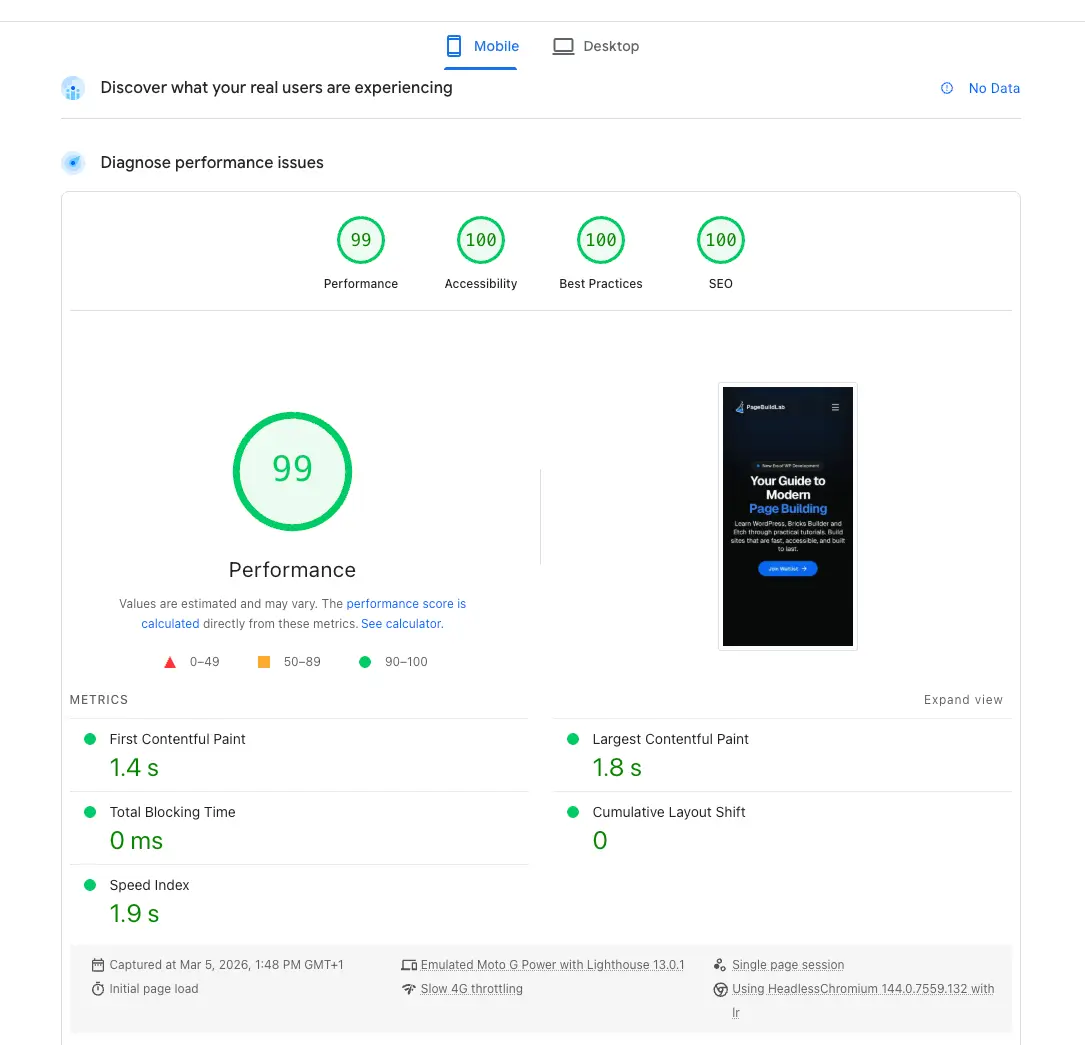
This is PageBuildLab. No performance plugin installed. No caching layer beyond what the host provides. The score is the result of starting with the right builder and making good decisions throughout the build, not patching problems after the fact.
The rule of thumb
If you need a performance plugin to fix your builder’s output, you’ve already lost ground. Choose a builder that generates clean HTML from the start and you won’t need to recover it.
Hosting
You can build the leanest site in the world and still score poorly if your Time to First Byte (TTFB) is high. TTFB is measured before any of your assets start loading, so it’s a bottleneck nothing downstream can fix. The quality of your hosting matters, though how much depends on your traffic volume and server configuration. The general principle: make sure server-level caching is configured and your PHP version is current.
Self-Host Your Fonts
Google Fonts is convenient. It’s also an external request to a third-party domain, which means it’s a potential bottleneck you don’t control.
Every time a visitor hits your page, their browser has to resolve fonts.googleapis.com, establish a connection, and wait for the stylesheet response before it can then fetch the actual font files from fonts.gstatic.com. On a fast connection this adds maybe 100-200ms. On mobile in a marginal signal area, it can add much more. And because fonts are typically render-blocking, that delay shows up directly in your Largest Contentful Paint score.
The fix is simple: download the font files, host them on your own server, and reference them with a local @font-face declaration.
@font-face {
  font-family: 'Inter';
  font-style: normal;
  font-weight: 400;
  font-display: swap;
  src: url('/fonts/inter-400.woff2') format('woff2');
}
Note the font-display: swap. This tells the browser to show fallback text immediately while the font loads rather than hiding text until the custom font is ready. It prevents the invisible-text-flash that tanks your LCP on slower connections.
The Google Webfonts Helper tool generates the CSS and provides the font files for download. The whole process takes five minutes per font family.
Third-Party Embeds and What They Actually Cost You
This one catches a lot of developers off guard. You build a fast site, test it, everything’s green. Then the client asks for an embedded Google Map on the contact page and a YouTube video on the homepage. You add them. Your score drops by 20 points.
Third-party embeds like YouTube videos or maps pull in a lot of JavaScript and tracking scripts that load before the content is ever interacted with. That weight shows up directly in your scores. For YouTube, a facade pattern is the cleanest solution: show the thumbnail on page load, inject the iframe only when the user clicks play.
The GDPR Angle
If you’re running a GDPR-compliant cookie banner, third-party scripts get blocked until the user consents. That means PageSpeed Insights, which runs without accepting cookies, isn’t testing your actual page. The embeds aren’t loading, the scripts aren’t firing. Your score won’t drop because of them. So don’t worry about that YouTube embed tanking your score — it’s blocked before PageSpeed even sees it.
PageSpeed vs. reality
If your site runs a consent banner, your PageSpeed score reflects a blocked, cookie-free version of your page. Take the number with a grain of salt.
Images: WebP, AVIF, and Lazy Loading
Images are almost always the heaviest assets on a page and among the easiest wins to take. Three things to get right on every build.
Format. JPEG and PNG are outdated defaults. WebP delivers comparable visual quality at roughly 25-35% smaller file sizes. AVIF goes further, often 40-50% smaller than WebP, though browser support is slightly narrower. In practice, serving WebP as the baseline is the right minimum. Most image optimization plugins handle conversion automatically, and some hosts convert on the fly.
Lazy loading. Images below the fold don’t need to load immediately. The browser’s native loading="lazy" attribute defers off-screen images until the user scrolls near them, which reduces initial page weight significantly. Bricks and most modern builders apply this by default. Just make sure your above-the-fold hero image is explicitly set to loading="eager" so it doesn’t get deferred when it shouldn’t be.
Keep Your Plugin Count Down
Every active plugin is a potential source of additional database queries, extra CSS or JavaScript being enqueued, and compatibility headaches. None of those are hypothetical risks. They’re the normal cost of running plugins.
The specific problems to watch for are plugins that enqueue scripts or styles on every page regardless of whether that page uses the plugin’s features, and plugins that run database queries on every page load even when caching is active.
Beyond raw performance, more plugins means more surface area for conflicts, more updates to manage, and more chances of something breaking after a WordPress core update.
The practical solution is to audit your plugin list on every project and ask whether each one is actually necessary. A lot of common plugin use cases can be handled with small amounts of custom code instead, particularly now that AI tools make writing that code much faster.
With AI tools you can generate small custom snippets in seconds. The result is a leaner codebase and one fewer plugin to maintain.
When It Makes Sense to Add a Performance Plugin
A few worth knowing about: WP Rocket is the most widely used and easiest to configure, handling page caching, file minification, and lazy loading in one place. Perfmatters takes a different angle, focusing on disabling unnecessary WordPress features and scripts rather than adding a caching layer. FlyingPress is another solid option worth looking into if WP Rocket isn’t the right fit for your setup.
The key word is “once those fundamentals are in place.” Adding WP Rocket on top of a bloated builder doesn’t fix the bloat. It just puts a caching wrapper around it. These tools work best when the underlying site is already lean.
Putting It Together
Fast sites aren’t fast because of a single plugin or a caching layer. They’re fast because the right decisions were made at every layer: the builder, the host, the fonts, the embeds, and the plugin stack.
The developers who consistently produce high scores do it by starting clean. They don’t install a bloated builder and then try to optimize the output. They pick tools that don’t generate junk in the first place, and then they leave well enough alone.
- Your page builder or theme choice is the single biggest performance variable. Builders like Bricks and Etch and themes like GeneratePress and Kadence generate lean HTML and load only the assets each page actually uses.
- TTFB is most of the time a hosting problem. If your server response time is slow, no amount of downstream optimization fully compensates for it.
- Self-host your fonts. External font requests are render-blocking by default. A local @font-face with font-display: swap is a simple fix that consistently improves LCP.
- Serve images in WebP or AVIF, lazy load everything below the fold, and preload your LCP image. Image optimization is the highest-impact technical win on most pages.
- Third-party embeds carry a real performance cost. Use a facade pattern for YouTube and be aware that GDPR consent layers change what actually loads during a PageSpeed test.
- Keep your plugin count lean. Audit every project and replace plugin functionality with small custom code snippets where possible. AI tools make this much faster than it used to be.
- Performance plugins like WP Rocket, Perfmatters, and FlyingPress are genuinely useful, but only once the underlying site is already clean. They amplify good work. They don’t fix bad foundations.